The Knowledge Is Already There
Most teams spend months carefully building their Notion workspaces. They write HR policies, draft product documentation, document onboarding procedures, and maintain a running FAQ that answers the questions new employees ask most often. It's all there, organized, maintained — and completely invisible to your AI assistant.
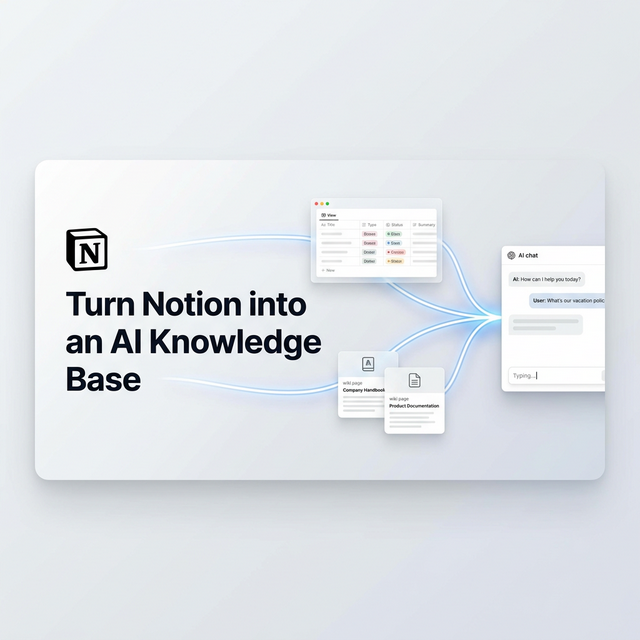
When a customer or employee asks a question that your Notion wiki already answers, they still wait. Sometimes for hours. Because the answer is locked inside a tool that your AI doesn't know exists. Mugib's Notion MCP adapter changes this entirely. Your Notion databases become searchable in real time, and your AI answers from your own team's documented knowledge.
Why Notion Works Exceptionally Well as an AI Knowledge Source
Unlike unstructured documents or raw text files, Notion databases have a property system that maps perfectly to what an AI needs. Every page has a title, a type, a status, a category. You've already organized your knowledge. The adapter simply surfaces it when the AI needs it.
The other thing that makes Notion exceptional for this purpose is that it's maintained by your team in real time. When your product manager updates the pricing policy on Thursday evening, the AI answers from the new version on Friday morning. No re-uploading. No re-training. No waiting for a knowledge base sync. The moment your team edits a Notion page, that change is live for the AI on the next query.
The Use Cases Are Broader Than You'd Think
The most obvious application is internal knowledge management: an employee asks about the company's remote work policy, and instead of pinging HR or digging through Notion manually, they ask the AI and get the answer in seconds. But the applications extend well beyond internal use.
Customer support teams use Notion to document their troubleshooting runbooks. Connect that Notion database to your customer-facing AI, and suddenly your bot can walk a customer through the same steps a senior support agent would use. Product teams maintain their feature documentation in Notion. Connect it to your sales AI, and it can accurately answer prospect questions about functionality without guessing. Pricing, plans, integrations, limitations — all searchable, all live, all accurate because they come from the one source of truth your team actually maintains.
An employee asks the HR bot: "How many vacation days do I get in my second year?" The AI searches the HR Notion database, finds the Leave Policy page, and replies with the exact policy your HR team wrote last quarter — not an approximation, not a guess. The actual policy.
How to Connect Notion to Mugib
You'll need two things: a Notion integration token and a shared database. Here's how to set both up.
Step 1 — Create a Notion Integration
Go to notion.so/my-integrations and click + New integration. Name it something descriptive like "Mugib AI", select your workspace, and set capabilities to Read content only — your AI should never be able to write to Notion. Submit the form and copy the Internal Integration Token that starts with secret_.
Step 2 — Share Your Database with the Integration
Open the Notion database you want to connect. Click the ... menu in the top right, go to Add connections, and select your Mugib integration. Then copy the database ID from the URL — it's the string of characters that appears after your workspace name and before the ? in the browser address bar.
Step 3 — Configure the MCP Source
Go to Admin → MCP Sources → Create Source and select Notion. Paste the database ID and your integration token. Set TITLE_PROP to the name of your title column (usually "Name" or "Title") and CONTENT_PROP to the property that contains the main content (often "Description" or "Content"). Add routing keywords that match the type of knowledge in this database — for HR policies: policy, vacation, leave, benefits, سياسة, إجازة; for product docs: feature, integration, how to, guide, ميزة, دليل. Assign the source to your project and activate it.
You can connect multiple Notion databases — one for HR, one for product documentation, one for support runbooks — each with its own keywords and routing logic. Your AI becomes a unified interface across all of them.
المعرفة موجودة بالفعل
معظم الفرق تقضي أشهراً في بناء مساحات Notion بعناية. تكتب سياسات الموارد البشرية، وتصيغ توثيق المنتجات، وتوثّق إجراءات الاستقبال، وتحافظ على قائمة أسئلة شائعة تجيب على ما يسأله الموظفون الجدد. كل شيء موجود، منظّم، محافظ عليه — وغير مرئي تماماً لمساعدك الذكي.
حين يسأل عميل أو موظف سؤالاً تجيب عليه ويكي Notion بالفعل، لا يزال ينتظر. أحياناً لساعات. لأن الإجابة محبوسة داخل أداة لا يعرف ذكاؤك الاصطناعي بوجودها. محول Notion MCP من مجيب يغيّر هذا كلياً. تصبح قواعد بيانات Notion قابلة للبحث بشكل لحظي، ويجيب ذكاؤك من معرفة فريقك الموثّقة.
لماذا يعمل Notion بشكل استثنائي كمصدر معرفة للذكاء الاصطناعي
على عكس المستندات غير المنظّمة أو ملفات النص الخام، تمتلك قواعد بيانات Notion نظام خصائص يتوافق تماماً مع ما يحتاجه ذكاء اصطناعي. كل صفحة لها عنوان ونوع وحالة وفئة. لقد نظّمت معرفتك بالفعل. المحول ببساطة يظهرها حين يحتاجها الذكاء.
الشيء الآخر الذي يجعل Notion استثنائياً لهذا الهدف هو أن فريقك يحافظ عليه بشكل لحظي. حين يحدّث مدير المنتجات سياسة التسعير مساء الخميس، يجيب الذكاء من النسخة الجديدة صباح الجمعة. لا إعادة رفع. لا إعادة تدريب. لا انتظار لمزامنة قاعدة معرفة.
حالات الاستخدام أوسع مما تتخيل
التطبيق الأوضح هو إدارة المعرفة الداخلية: يسأل موظف عن سياسة العمل عن بعد، وبدلاً من إرسال رسالة لـ HR أو البحث يدوياً في Notion، يسأل الذكاء ويحصل على الإجابة في ثوانٍ. لكن التطبيقات تتجاوز الاستخدام الداخلي بكثير.
فرق دعم العملاء توثّق دليل استكشاف الأخطاء في Notion. اربط قاعدة البيانات تلك بالذكاء الموجّه للعملاء، وفجأة يستطيع الروبوت إرشاد العميل عبر نفس الخطوات التي يستخدمها وكيل دعم متمرس. فرق المنتجات توثق ميزاتها في Notion. اربطها بذكاء المبيعات، فيستطيع الإجابة بدقة على أسئلة المرتقبين حول الوظائف بدون تخمين.
يسأل موظف روبوت HR: "كم يوم إجازة أحصل عليها في سنتي الثانية؟" يبحث الذكاء في قاعدة بيانات HR في Notion، يجد صفحة سياسة الإجازات، ويجيب بالسياسة الدقيقة التي كتبها فريق HR الربع الماضي — لا تقريب ولا تخمين. السياسة الفعلية.
كيفية ربط Notion بمجيب
تحتاج شيئَين: رمز تكامل Notion وقاعدة بيانات مشتركة. إليك كيفية إعداد كليهما.
الخطوة الأولى — إنشاء Notion Integration
توجّه إلى notion.so/my-integrations وانقر + New integration. سمّها شيئاً وصفياً مثل "Mugib AI"، اختر مساحة عملك، واضبط الصلاحيات على Read content فقط. أكمل النموذج وانسخ Internal Integration Token الذي يبدأ بـ secret_.
الخطوة الثانية — مشاركة قاعدة البيانات
افتح قاعدة بيانات Notion التي تريد ربطها. انقر قائمة ... أعلى اليمين، توجّه إلى Add connections، واختر تكامل مجيب. ثم انسخ معرّف قاعدة البيانات من الرابط — هو سلسلة الأحرف التي تظهر بعد اسم مساحة العمل وقبل ? في شريط العنوان.
الخطوة الثالثة — تهيئة مصدر MCP
توجّه إلى Admin → MCP Sources → Create Source واختر Notion. الصق معرّف قاعدة البيانات ورمز التكامل. اضبط TITLE_PROP على اسم عمود العنوان (عادةً "Name" أو "Title") وCONTENT_PROP على الخاصية التي تحتوي المحتوى الرئيسي. أضف كلمات مفتاحية للتوجيه تتناسب مع نوع المعرفة في قاعدة البيانات — لسياسات HR: سياسة، إجازة، مزايا، policy, leave, benefits؛ لتوثيق المنتجات: ميزة، دليل، تكامل، feature, guide, how to. عيّن المصدر لمشروعك وفعّله.
يمكنك ربط قواعد بيانات Notion متعددة — واحدة للموارد البشرية، واحدة لتوثيق المنتجات، واحدة لأدلة الدعم — كل واحدة بكلماتها المفتاحية ومنطق توجيهها. يصبح ذكاؤك واجهة موحدة عليها جميعاً.